





Automating Deployment with Jenkins, AWS ECS and AWS ECR
BySurender Tanwar

Table of contents
Introduction
In today's fast-changing digital world, it's important for businesses to have quick and efficient deployment plans to stay ahead. Using automation tools like Jenkins with AWS services like AWS ECS (Elastic Container Service) and AWS ECR (Elastic Container Registry) can make the deployment process much smoother.
AWS ECS (Elastic Container Service) provides a platform for managing containers, making it simple for developers to deploy, manage, and scale containerized applications. By making infrastructure management easier, AWS ECS allows teams to focus on building and improving their applications, without the need to be concerned about underlying infrastructure.
AWS ECR (Elastic Container Registry) adds to AWS Elastic Container Service by offering a secure and scalable repository for storing Docker container images. With AWS ECR, teams can easily push, pull, and manage Docker container images, ensuring a smooth deployment process from development to production.
Jenkins acts as the controller of the deployment process, automating each stage from code integration to application deployment. Its flexibility allows teams to customize and optimize their deployment workflows, improving efficiency and minimizing the risk of human error.
In today's competitive world, rapidly deploying and growing applications is very important. This is where using AWS ECS (Elastic Container Service), AWS ECR (Elastic Container Registry), and Jenkins pipeline together works best. By automating deployment and using cloud-based services, teams can save money, ensure their system is always available, and make it easy to grow.
Why Automate?
Automating deployment processes has several benefits:
- Efficiency: Automation reduces manual intervention, making deployment faster and minimizing the risk of errors.
- Consistency: Automated pipelines make sure that deployment processes are the same in all environments, from development to production.
- Scalability: By automatically changing resources as required, businesses can easily manage more users.
- Cost Optimization: Automation helps optimize resource usage, reducing infrastructure costs and getting the most out of investments.
Architecture Overview:
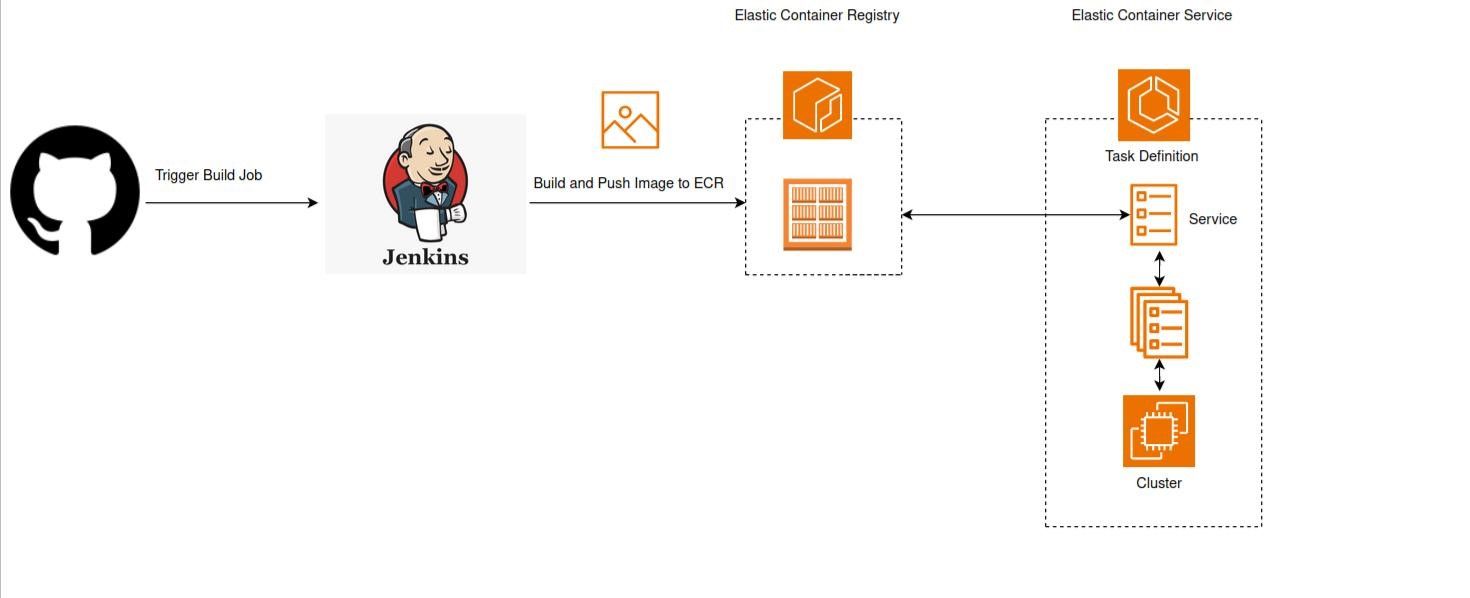
Components
- Git: A distributed version control system used for tracking changes in source code during software development. Developers push code changes to Git repositories, triggering the CI/CD pipeline.
- Jenkins: An automation server that orchestrates the CI/CD pipeline. Jenkins listens for code changes, triggers build, runs tests, and deploys applications to AWS ECS (Elastic Container Service) based on predefined workflows.
- Docker: A containerization platform used to package applications and their dependencies into Docker images. Dockerized applications are consistent and can be moved easily between different environments.
- AWS ECR Repository: A managed Docker container registry provided by AWS. AWS ECR (Elastic Container Registry) stores Docker container images pushed by the Jenkins pipeline securely and efficiently.
- AWS ECS Cluster: A group of AWS EC2 instances or Fargate tasks where containers are deployed and managed.
- Task Definition: A JSON file defining the configuration for one or more containers, including Docker image, CPU and memory allocation, networking, and logging settings.
- Service: A resource in AWS ECS (Elastic Container Service) that makes sure a certain number of tasks (containers) are running and takes care of their life cycle, including scaling, rolling updates, and maintaining high availability.
- Task Scheduler: AWS ECS's built-in task scheduler that places tasks on container instances within the cluster based on resource requirements and availability.
Workflow
The workflow of the Jenkins pipeline integrated with AWS ECS and ECR typically includes the following steps:
- Code Commit: Developers push code changes to the version control system (e.g., Git).
- Jenkins Build: Jenkins pipeline triggers a build process, compiling code and creating Docker images.
- Building Docker Images: The Jenkins pipeline starts by fetching the source code from the version control system (e.g., Git). Using the build instructions defined in the Dockerfile within the source code repository, Jenkins builds Docker container images for the application components.
- Pushing Images to AWS ECR Repository: Once the Docker images are successfully built, Jenkins pushes these images to the AWS ECR repository. AWS ECR (Elastic Container Registry) provides a secure and scalable storage solution for Docker container images, ensuring they are easily accessible to AWS ECS for deployment.
- Updating AWS ECS Task Definitions: Jenkins pipeline updates the AWS ECS task definitions with the latest version of the Docker images stored in AWS ECR repository. AWS ECS task definitions define the configuration of containers, including which Docker image to use, CPU and memory allocations, networking settings, and container dependencies.
- Deploying Containers to AWS ECS Clusters: After updating the task definitions, Jenkins triggers AWS ECS service updates or deployments. AWS ECS services manage the deployment and scaling of containers based on the configured task definitions. During deployment, AWS ECS (Elastic Container Service) pulls the specified Docker images from AWS ECR (Elastic Container Registry) and launches container instances within AWS ECS clusters. AWS ECS (Elastic Container Service) automatically handles load balancing, service discovery, and health checks to ensure the availability and reliability of deployed containers.
AWS ECS (Elastic Container Service) Task Definitions and Services
- AWS ECS Task Definitions: Task definitions are blueprints for running containers in AWS ECS (Elastic Container Service). They specify details like the Docker image, resource allocation, networking, and logging settings for each container in a task.
- AWS ECS Services: Services in AWS ECS (Elastic Container Service) make sure the desired number of tasks (containers) are running as defined by task definitions. AWS ECS manages the tasks' lifecycle, including scaling, updates, and maintaining high availability.
Utilization of AWS ECR (Elastic Container Registry)
- Storing Docker Images: AWS ECR (Elastic Container Registry) is a centralized repository for storing Docker images pushed by the Jenkins pipeline.
- Secure and Reliable Storage: AWS ECR (Elastic Container Registry) provides secure storage with encryption at rest, AWS IAM (Identity and Access Management) authentication, and fine-grained access control.
- Versioning and Tagging: Images stored in AWS ECR repository are versioned, allowing for easy rollback to previous versions if needed. Tags can also be used to label images for different environments (e.g., development, staging, production).
Benefits
Integrating Jenkins pipeline with AWS ECS and ECR offers several benefits:
- Cost Efficiency: Organizations can save money by using resources effectively, automating how they're managed over time, and adjusting the amount of resources used depending on how much is needed. This saves money by avoiding paying for more than necessary and reducing waste.
- High Availability: Using blue-green deployments with Jenkins pipeline makes sure there's no downtime during updates. By using AWS ECS service auto-scaling based on AWS CloudWatch metrics, availability is maintained during increases in traffic. This means the web application stays accessible and responsive even if there are infrastructure issues or sudden increases in visitors.
- Scalability: Using rolling updates in Jenkins pipeline ensures smooth scaling without any downtime. By connecting AWS Elastic Load Balancer (ELB) with AWS ECS services to distribute traffic across containers, it's easy to scale horizontally. Also, containerization helps in creating modular and scalable architectures, allowing organizations to adjust specific parts independently as needed.
- Performance Optimization: Using AWS CloudWatch metrics and logs, organizations can understand how well their AWS ECS clusters and services are performing. This allows them to monitor, fix issues, and improve application performance in advance, ensuring users have a smooth experience.
- Reliability: To make sure things are consistent and reliable, and to reduce the chance of mistakes and system downtime, we use automated deployment pipelines.
- Security: AWS ECR (Elastic Container Registry) offers safe and private storage for Docker container images. It controls who can access sensitive data by giving detailed access permissions only to authorized users and services. AWS ECS (Elastic Container Service) works with AWS Identity and Access Management (IAM) to manage access and apply security rules.
Conclusion
Automating container deployment with Jenkins pipeline and AWS ECS (Elastic Container Service) and ECR (Elastic Container Registry) is a strong way to make your applications work better, be more reliable, and handle more traffic in the cloud.
By using automation tools and services built for the cloud, businesses can save money, make deployment smoother, and give users a better experience. Start using automation and get the most out of your containerized work on AWS.