





The Hidden Benefits of Using AWS ECS for Scalable Applications
ByAnjali Jain

Amazon ECS (Elastic Container Service) is a fully managed container orchestration service from AWS that deploys, scales, and manages Docker containers without requiring you to operate a control plane. Unlike Amazon EKS, which costs $0.10/hour (~$73/month) per cluster, the ECS control plane is free you only pay for the underlying EC2 or Fargate compute. ECS integrates natively with AWS services such as IAM, CloudWatch, ALB, and Fargate, runs on EC2, Fargate, or on-premises via ECS Anywhere, and powers massive-scale workloads (Amazon itself ran 77.24 million ECS tasks on Prime Day 2024). Notable users include Samsung, Expedia, and Amazon.com. Best fit: teams that want container orchestration without the operational overhead of Kubernetes.
AWS ECS (Amazon Elastic Container Service) manages these containers for you. It automatically handles deployment, scaling, and monitoring. Companies like Samsung and Expedia use Amazon ECS to run their applications reliably.
Most people know ECS runs containers. But they miss the benefits that save time and money and simplifying daily operations. This blog reveals those hidden benefits. You'll learn how ECS makes application scaling simpler, faster, and more cost-effective.
What is AWS ECS?
AWS ECS (Amazon Elastic Container Service) is a fully managed container orchestration service that runs Docker containers on AWS infrastructure. It was launched by Amazon in 2014 and is one of two native container services AWS offers the other being Amazon EKS (Kubernetes). ECS handles the work of:
- Scheduling containers onto compute capacity
- Restarting failed containers
- Scaling containers up or down based on demand
- Integrating containers with load balancers, IAM roles, logging, and monitoring
You define your application in a task definition (a JSON file that specifies the container image, CPU, memory, networking, and IAM role), and ECS takes care of running it reliably.
How ECS Works?
ECS has three core building blocks:
- Task definition: A blueprint for your application — container image, CPU, memory, ports, env vars, IAM role
- Task: A running instance of a task definition (one or more containers)
- Service: A long-running group of tasks that ECS keeps at a desired count behind a load balancer
- Cluster: A logical group of compute capacity (EC2 instances, Fargate, or on-premises nodes) that runs your tasks
The workflow in practice:
- You package your app into a Docker image and push it to Amazon ECR (or any OCI-compatible registry).
- You write a task definition referencing that image.
- You create an ECS service that says "run 5 copies of this task, put them behind this load balancer."
- The ECS scheduler places the tasks on available compute, monitors them, and replaces unhealthy ones automatically.
What is AWS ECS used for?
Common production use cases for Amazon ECS include:
- Running microservices behind an Application Load Balancer with service discovery via AWS Cloud Map.
- Batch processing and scheduled jobs using ECS scheduled tasks or AWS Batch on ECS.
- Hosting web applications and APIs that need zero-downtime deployments.
- CI/CD build workers that run containerized test and build steps.
- Machine learning inference that serves containerized models behind an API.
- Hybrid workloads across cloud and on-premises using ECS Anywhere.
Companies such as Samsung, Expedia, Capital One, and Amazon.com use ECS in production. On Prime Day 2024, Amazon ran 77.24 million ECS tasks in a single day, a 23% year-over-year increase.
AWS ECS Benefits
- Scalability and Flexibility
AWS ECS is a game-changer when it comes to scaling containerized applications. As your business grows, ECS adapts to your needs using AWS Auto Scaling. You can set custom rules to manage tasks in your cluster automatically. This ensures that your applications handle traffic spikes seamlessly while keeping costs optimized.
Whether you're experiencing sudden growth or seasonal variations, AWS ECS scales your infrastructure up or down without manual intervention.
- Serverless Container Management
Amazon ECS works seamlessly with AWS Fargate. AWS Fargate is a serverless compute engine that runs containers without the need to manage servers. It removes the burden of handling tasks such as server setup, scaling, resource allocation, patching, and security.
You simply choose your ECS container image, set up the required memory and CPU, and run it on AWS ECS Fargate. It manages everything needed to run your containers efficiently across different compute options. This cuts operational work and lets your team focus on building applications, not maintaining servers.
- Cost-Effectiveness and Resource Optimization
AWS ECS helps reduce infrastructure costs by running multiple containers on the same EC2 instances using smart scheduling methods like bin pack and spread placement. This makes better use of computing resources and lowers hardware expenses. It also supports Spot Instances, which use unused EC2 capacity at lower prices. Overall, it’s a cost-effective solution for startups and enterprises to scale efficiently.
- Enhanced Through Multi-Layer Protection
When it comes to digital security, AWS ECS provides comprehensive protection through multiple security layers. Being part of the AWS ecosystem, ECS integrates seamlessly with AWS Identity and Access Management (IAM), AWS Security Hub, and third-party security tools. Key security features include:
- Granular permissions allowing each container to operate following the least privilege principle.
- Container isolation with dedicated network and resource allocation, preventing compromised containers from affecting others.
- Encryption options for data at rest using AWS Key Management Service (KMS).
- AWS GuardDuty integration for proactive external threat detection.
- AWS CloudTrail integration providing detailed logs of all API calls and actions for comprehensive auditing and compliance.
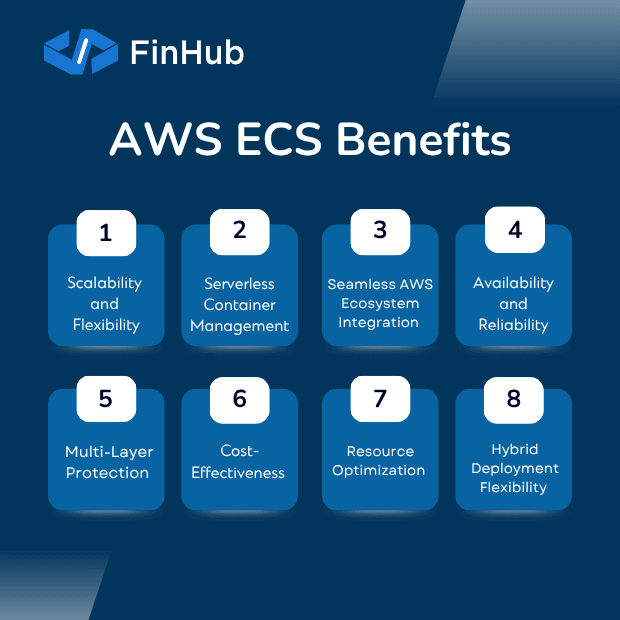
- High Availability and Reliability
ECS comes with built-in high availability and fault tolerance features that ensure your applications stay available. The platform employs robust health monitoring mechanisms to maintain application availability through:
- Automatic container restarts that detect failures and restore services quickly, minimizing downtime.
- Custom health check scripts defined in task definitions to continuously track container health.
- Elastic Load Balancing (ELB) integration that distributes traffic evenly across multiple healthy containers and instances, eliminating single points of failure.
- Automatic replacement of unhealthy containers to maintain desired task counts. Application Load Balancers (ALB) maintains a repository of container health status. It immediately removes unhealthy containers to ensure only healthy instances handle requests.
- Seamless AWS Ecosystem Integration
ECS provides native integration with various AWS services, creating a powerful, cohesive infrastructure:
- AWS Cloud Formation for automated and scalable resource management.
- Amazon Cloud Watch for real-time metrics, logs, and alarm monitoring.
- AWS X-Ray for application behavior analysis and performance insights.
- AWS Cloud Map for service discovery and registration with custom names for easy discoverability.
- AWS Service Connect to simplify network configurations between microservices This seamless integration provides a unified management experience.
- Simplified Networking and Service Communication
Amazon ECS offers services like Service Connect and load balancing to help seamless communication between microservices. Service Connect simplifies network configurations. It allows developers to focus on core application development rather than complex network setups. It leverages AWS Cloud Map to discover, connect, and register containerized services automatically. This ensures that different services within your microservice architecture can communicate with ease.
- Hybrid Deployment Flexibility
With ECS, organizations can extend container management beyond the cloud. They can manage containers on on-premises environments, including virtual machines, bare-metal servers, and edge devices. This hybrid flexibility allows teams to use the same ECS control plane and tools to manage containers consistently.
How does AWS ECS handle security?
ECS security is built on AWS primitives rather than a separate policy engine:
Task-level IAM roles - each container gets its own IAM role following least privilege. VPC-native networking (awsvpc mode) — every task gets its own elastic network interface and security group, isolating network traffic at the task level. Encryption at rest via AWS KMS — for EBS volumes, Secrets Manager, Parameter Store, and ECR images. AWS GuardDuty integration — detects malicious container behavior and credential compromise at runtime. AWS CloudTrail logging — every ECS API call is logged for audit and compliance. Private image scanning — Amazon ECR scans container images for CVEs on push.
Combined with IAM, Security Hub, and VPC security groups, ECS meets common compliance frameworks including SOC 2, HIPAA, PCI DSS, and FedRAMP.
Ready to Take the Next Step?
Getting started with AWS ECS is a multi-step process. This starts by moving from traditional applications to modern microservices. That means running them in containers and scaling them easily in the cloud. This process needs a good understanding of Amazon ECS and how it works with other AWS tools.
HabileLabs is an Advance Tier Partner in India and holder of the Amazon ECS Service Delivery designation, recognizing proven expertise in deploying and managing production workloads on Amazon ECS. The team helps businesses design, migrate, and operate containerized applications on AWS — from initial architecture through ongoing managed operations.