





How Does Agentforce Work in Salesforce? | A Beginner's Guide
ByDishank Sharma

If you've logged into Salesforce in the last year, you've seen the word "Agentforce" across release notes, and the Setup menu. It's hard to miss, and it's not a minor feature. It represents a fundamental shift in Salesforce’s strategy, i.e., moving away from tools that simply suggest what you should do, and introducing tools that actually do the work for you.
This guide walks through what Agentforce actually is, how it works, and what you need in place before adopting it completely and making the most out of the existing data.
With that said, let's get started!
What Is Agentforce?
Agentforce is Salesforce's platform for building autonomous AI agents inside your org. These agents are native to the Salesforce platform and can handle tasks across sales, service, and marketing, like updating records or escalating cases, without human input.
The key here is to realize that there's a difference between an AI assistant and an AI agent.
While an assistant helps a human do something faster: draft an email, summarize a case, an agent does the task itself. It decides what needs to happen, pulls the data it needs, and takes the action, only looping in a human when the situation calls for it.
Agentforce combines assistive AI, which helps with tasks like summarizing customer interactions, with autonomous AI, which can make decisions and take action on its own.
In the end, the goal is not to replace your service or sales team. It is to take the repetitive parts off their plate so they can spend time on the parts that actually need a person.
How Does Agentforce Actually Work?
Every agent you build relies on three core ingredients to function: Data, Reasoning, and Actions.
Hence, knowing them is the fundamental step to understanding Agentforce. Here's what you need to know -
1. Data: What the Agent Knows
An agent is only as smart as the information it can see. Agentforce connects natively to Data Cloud to access your structured CRM data (like Accounts, Cases, and Opportunities) alongside unstructured data (like emails, PDFs, and call transcripts) in real time.
This is where Data 360 (formerly Data Cloud) comes in. It gives agents real-time access to the data they need without copying it from existing warehouses, and agents can refer to both structured and unstructured connected data. That includes standard Salesforce records (accounts, cases, opportunities) and unstructured sources like emails or call transcripts.
Always remember, if your CRM data is messy, outdated, or incomplete, your agent will make automated decisions based on poor information. Clean data is non-negotiable.
2. Reasoning: How the Agent Decides
Instead of relying on rigid, hard-coded workflow rules, or basic keyword chatbots, Agentforce uses the Atlas Reasoning Engine.
Atlas relies on a process called Retrieval-Augmented Generation (RAG). In simple terms, instead of the AI guessing an answer based purely on its general training, RAG allows the agent to securely pull live, current data from your specific Salesforce org the exact moment a customer asks a question.
It processes that context to figure out the most accurate next step.
3. Actions: What the Agent Can Do
Knowing the answer is not enough; the agent needs to execute. From the Agentforce Builder, admins can declaratively assign "Actions" to an agent. These actions can trigger a Salesforce Flow, run Apex code, or call external APIs through MuleSoft. This allows an agent to physically update a record, process a return, or book a meeting without human intervention.
In practice, this means an agent can be assigned specific Actions, things like updating a record, triggering a Flow, or calling an external API through MuleSoft.
Adding an action is largely declarative: from the Agentforce Builder, you pick a reference action type (Apex, Flow, a prompt, or a MuleSoft API call) and reference an existing process, after which the agent can query that source just like a human user would.
Where Agentforce Fits in Salesforce?
When working with Agentforce, you will realize that it is not like any other plug-in or product that stays on your system.You will see Agentforce show up across nearly every part of the platform, not as one single product but as a layer applied to existing clouds.
Agentforce Sales takes on the outbound grind, things like emails, lead follow-up, and booking meetings, so reps spend less time prospecting and more time closing.
Agentforce Service answers customer questions, manages cases, and knows when to hand off to a human instead of guessing its way through something it shouldn't.
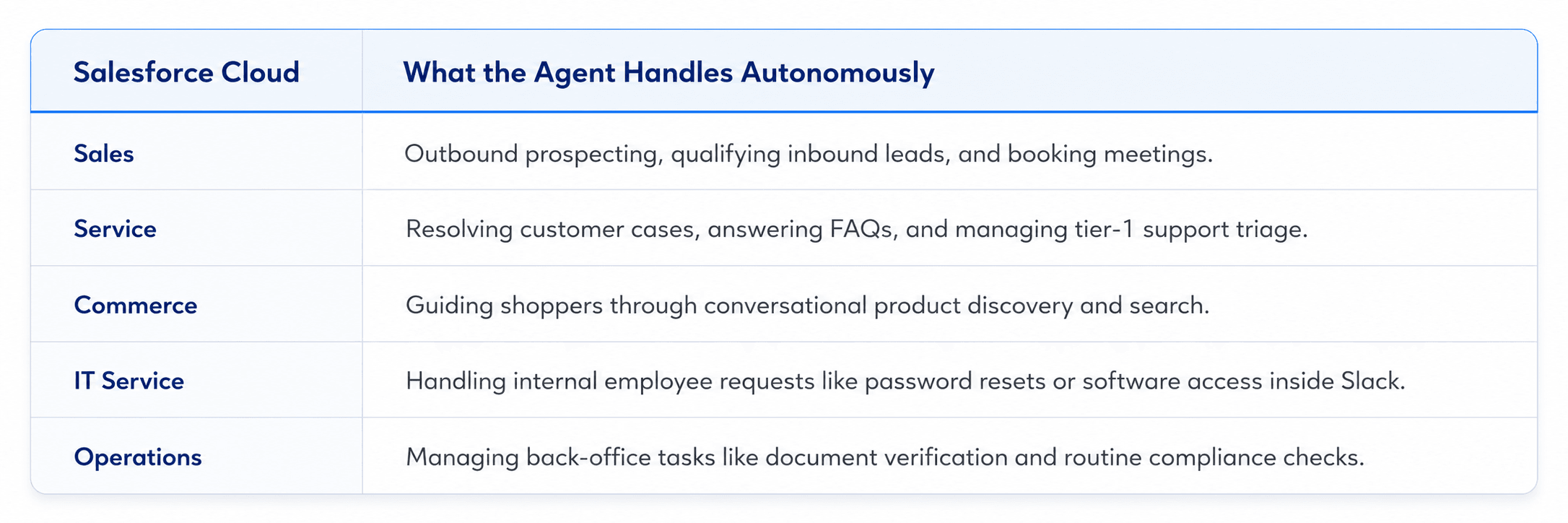
Agentforce is natively integrated with the entire Salesforce Customer 360, so agents can use complete customer context from your CRM applications and take action directly within the flow of work for your employees. It can also be embedded across web and mobile chat, email, SMS, and Slack, with agents able to hand off to a human employee on any channel when needed.
Agentforce vs. Einstein AI: What's the Difference?
If you've used Salesforce for a while, you've already worked with Einstein: lead scores, next-best-action suggestions, predictive insights. So how is Agentforce different?
The simplest way to think about it: Einstein tells you what to do. Agentforce does it. Einstein AI provides predictions and recommendations that a human acts on, while Agentforce executes those actions autonomously. Einstein handles the analytical layer, and Agentforce handles the operational layer, and both can run in the same org at the same time.
This matters for planning a rollout. If your Einstein data signals, things like lead scoring and activity capture, aren't set up properly, your agents inherit that same weak foundation. The smart sequence is to audit and fix your existing Einstein settings before turning agents loose on top of them.
What You Need Before Building Your First Agent – Your Checklist
Salesforce markets Agentforce as something you can build with clicks, not code, and for straightforward use cases, that's largely true. But a few things need to be in place first.
- Clean, Structured Data: Your Salesforce data is clean and structured. Agents produce accurate results only when the records they read are up to date. Data quality is the single most important environmental factor before deploying Agentforce.
- A Scoped Use Case: Don't start by trying to automate everything. Pick one use case with high daily volume and low decision complexity. Common starting points are answering frequent customer service questions or qualifying inbound leads.
- Guardrails, Configured Up Front: Agentforce contains a set of low-code guardrails and security tools designed to keep data secure and prevent agents from deviating from their instructions, and these are on by default but configurable by admins.
- A Sandbox To Test in First: Build a single agent in a sandbox, test it against real scenarios, measure what it handles correctly and where it fails, and use those results before expanding to other workflows. The orgs that skip this step almost always end up doing it anyway, just after the agent is already live and something's gone wrong in front of a customer.
Getting Started: Your First Steps
If you're an admin on Salesforce Enterprise Edition or above, the entry point is simpler than most people expect. Salesforce states that Foundations gives every eligible customer free access to Agent Builder, Prompt Builder, and a starting allotment of Flex Credits and Data Cloud credits, plus a batch of free service conversations to test with.
The practical first move: open Setup, search "Agentforce," and turn on Foundations if it isn't already active. From there, build one agent around one well-defined task, test it in a sandbox, and measure the results before deciding what comes next.
How HabileLabs Can Help You Become Agentforce Ready?
Deploying autonomous agents requires careful sequencing. As a Salesforce Certified Partner with dedicated Agentforce Specialists, HabileLabs helps you move safely from a raw sandbox build to high-impact production reality.
Here is exactly how we bridge the gap between Agentforce strategy and execution:
- Use Case Scoping & Strategy: We audit your existing workflows to identify high-volume, low-complexity tasks that will deliver a measurable ROI within weeks, avoiding stalled pilots.
- Data Cloud Setup & Grounding: Your agents are only as smart as the data they can see. We structure your CRM records and securely wire them into Data Cloud so the Atlas Reasoning Engine always pulls accurate, real-time context.
- Custom Pro-Code Extensions: When out-of-the-box clicks hit a wall, our engineering team writes custom Invocable Apex, sets up automated flows, and builds custom APIs to let your agents trigger complex, multi-step actions.
- Guardrails & Security: We configure strict, low-code security guardrails and data privacy filters upfront, ensuring your AI operates safely within its exact boundaries.
- Sandbox Testing & Optimization: We build and test your agent inside a safe sandbox environment against real-world customer scenarios, fine-tuning its performance before it ever interacts with a live customer.
If you're evaluating Agentforce for your org, or you've already started and the pilot isn't moving the way you expected, talk to our team before scaling further.
Where to Start:
Agentforce isn't a feature you flip on. It's a layer of autonomous agents sitting on top of the Salesforce platform you already run, working off your own data and reasoning through it via RAG. The agents are only as good as the data and guardrails behind them. That's exactly why the orgs getting real results picked one clean use case first, instead of rolling agents out company-wide on day one.
If you're new to this, don't overthink the first move: one agent, one task, a sandbox to test it in, and a way to measure whether it worked. Everything else can wait until one thing is working.
That will be all for this post! Thanks for reading, Good luck!
Frequently Asked Questions
- What is the difference between an AI assistant and an AI agent?
An AI assistant (like Einstein Copilot) helps a human work faster by drafting emails or summarizing text, but a human still has to review and hit send. An AI agent (Agentforce) is autonomous-it analyzes the issue, pulls the necessary data, and executes the entire task from start to finish without human intervention unless it hits a roadblock.
- Do I need Data Cloud to use Agentforce?
Yes, Data Cloud serves as the foundational data layer for Agentforce. It connects your structured CRM data (Accounts, Cases) and unstructured data (emails, transcripts) in real time. Because the agent's reasoning relies entirely on this data, having a clean, properly configured Data Cloud setup is essential for accurate agent behavior.
- What is the Atlas Reasoning Engine?
The Atlas Reasoning Engine is the "brain" behind Agentforce. Instead of relying on rigid, hard-coded rules like traditional chatbots, Atlas uses Retrieval-Augmented Generation (RAG). It evaluates user requests, pulls live context from your Salesforce data, plans the necessary steps, and executes them dynamically.
- Can Agentforce agents interact with systems outside of Salesforce?
Yes. Using Agentforce Builder, admins and developers can assign actions that connect to external databases, ERPs, or third-party applications via MuleSoft APIs, Apex code, or Salesforce Flows. This allows agents to perform cross-platform tasks like processing refunds or checking external shipping status.
- Is Agentforce safe to use with sensitive customer data?
Yes, Agentforce is built with strict, low-code security guardrails that are active by default. It operates entirely within Salesforce’s trust boundary, meaning it respects your existing role-based data access controls, automatically masks sensitive data (like PII), and prevents data leakage or deviation from assigned instructions.
- How can my organization get started with Agentforce?
If you are on Salesforce Enterprise Edition or higher, you likely have access to Salesforce Foundations. This package includes free introductory access to the Agent Builder and Prompt Builder alongside baseline Data Cloud credits. The best first step is to open Setup, search Agentforce, and begin testing a single, highly scoped use case in a sandbox.