






Introduction
A single cloud misconfiguration is all it takes. According to IBM's 2024 Cost of a Data Breach report, the average cost of a cloud-related breach reached $4.88 million and the majority trace back not to sophisticated attacks, but to insecure configurations, overpermissioned roles, and gaps in monitoring.
For companies migrating to or operating on Amazon Web Services (AWS), security is not an afterthought; it is the foundation of every architectural decision. AWS offers one of the most comprehensive security frameworks in the cloud industry, but the tools are only as effective as the strategy behind their implementation. As a trusted AWS Partner, HabileLabs has helped enterprises across sectors architect resilient, audit-ready cloud environments that meet the strictest regulatory and business standards from SOC 2 and ISO 27001 to PCI DSS and internal governance requirements.
This guide walks through the core AWS security measures, what each layer protects, and how to apply them effectively whether you are running a SaaS platform, a financial application, a multi-tenant B2B product, or a multi-account enterprise environment.
These are crucial to protect your data and resources from threats. In this blog, we'll explore essential AWS security practices to help you get started on the right foot.
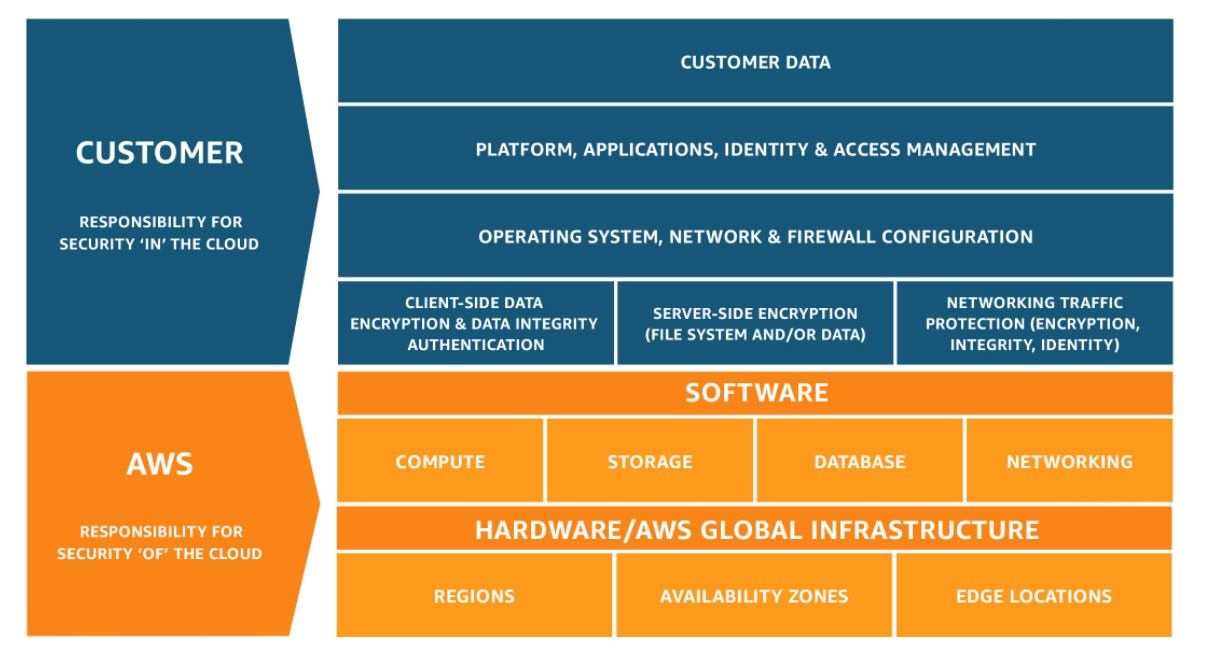
- The AWS Shared Responsibility Model: Who Secures What? Before diving into specific services, it is essential to understand the foundational principle of cloud security on AWS: the Shared Responsibility Model.
AWS secures the cloud its physical data centers, networking hardware, hypervisors, and global infrastructure. You, the customer, are responsible for security in the cloud your data, applications, identity configurations, network settings, and operating systems. In plain terms:
AWS's job: Physical security, hardware redundancy, global network infrastructure, and hypervisor-level isolation. Your job: IAM policies, encryption configuration, network access controls, application security, and compliance configuration.
This distinction matters practically: AWS can guarantee that the underlying infrastructure is protected, but misconfigured resources improperly exposed S3 buckets, overpermissioned IAM roles, unencrypted databases — remain entirely the customer's liability.
This is where a specialized AWS partner like HabileLabs bridges the gap, implementing the customer-side controls that keep workloads audit-ready and breach-resistant.
For more ideas, refer to the image below.
Identity and Access Management (IAM): The First Line of Defense
AWS Identity and Access Management (IAM) is the cornerstone of cloud security. It controls who can access what, under which conditions, and with what level of permission.
Key IAM Best Practices Principle of Least Privilege Every user, role, and service should be granted only the minimum permissions needed to perform its function. Over-permissioned accounts are one of the most commonly exploited vulnerabilities in cloud environments.
Multi-Factor Authentication (MFA) MFA should be mandatory for all IAM users especially those with administrative access. Hardware security keys (such as YubiKeys) provide the strongest second factor for privileged accounts.
No Root Account Access The AWS root account should be locked away immediately after account creation. All operational access should occur through IAM users or roles with appropriately scoped policies.
Role-Based Access Control (RBAC) Rather than assigning permissions to individual users, create IAM roles tied to job functions. Federate identity through SAML 2.0 or OIDC providers to centralize access management across your organization.
Regular Privilege Audits Use AWS IAM Access Analyzer to surface unused permissions and identify roles that have accumulated excessive entitlements over time. Quarterly audits are a solid baseline for most organizations.
For multi-account architectures common in enterprises with separate environments for dev, staging, and production AWS Organizations and Service Control Policies (SCPs) allow centralized governance of what child accounts are permitted to do, enforcing security guardrails at scale.
Network Security: Building Defense-in-Depth
A well-secured AWS environment uses multiple overlapping layers of network controls not a single perimeter firewall.
Virtual Private Cloud (VPC) Architecture A VPC creates an isolated network environment within AWS. Best practice is to:
Place all sensitive resources (databases, internal APIs) in private subnets with no direct internet access.
Use public subnets only for load balancers and NAT gateways. Implement VPC Flow Logs to capture all inbound and outbound traffic for forensic analysis and anomaly detection.
Use VPC Endpoints to access AWS services (S3, KMS, etc.) without routing traffic over the public internet, reducing your attack surface.
Security Groups and Network ACLs Security Groups act as stateful virtual firewalls at the instance level. Apply least privilege here too restrict inbound rules to known IP ranges and necessary ports only, and deny all traffic by default.
Network Access Control Lists (NACLs) operate at the subnet level and provide a stateless additional layer of control, useful for blocking specific IP ranges or protocols across an entire subnet.
AWS WAF and AWS Shield AWS WAF (Web Application Firewall) protects web applications from common exploits SQL injection, cross-site scripting, and malicious bots. Pair WAF with AWS Shield Advanced for enterprise-grade DDoS protection, particularly important for public-facing applications and APIs.
Data Encryption: Protecting Sensitive Data at Rest and in Transit
Encryption is a non-negotiable baseline for any cloud workload handling sensitive business, financial, or user data. AWS provides robust native encryption capabilities across its storage, database, and transmission services.
Encryption at Rest AWS Key Management Service (KMS) is the central hub for managing encryption keys across AWS services. Customer-managed keys (CMKs) give organizations full control over key rotation, access policies, and audit trails. Key services to encrypt:
Amazon S3 Enable default server-side encryption using AWS KMS keys on all buckets. Enforce bucket policies that explicitly deny unencrypted uploads.
Amazon RDS Enable encryption at rest on all database instances at creation. Encryption cannot be retroactively applied to an existing unencrypted instance.
Amazon EBS Encrypt all EBS volumes attached to EC2 instances that process or cache sensitive data.
Amazon DynamoDB Enable encryption at rest using AWS-owned or customer-managed KMS keys.
Encryption in Transit All data moving between clients and AWS services, and between services within your architecture, should use TLS 1.2 or higher. AWS Certificate Manager (ACM) simplifies SSL/TLS certificate provisioning and renewal, eliminating the risk of expired certificates leaving traffic exposed.
For secure file transfers between systems or external partners, use AWS Transfer Family with SFTP rather than unencrypted FTP protocols.
HabileLabs Insight: We configure end-to-end encryption across the entire data lifecycle from ingestion through processing to archival so sensitive data never traverses the network or rests in storage without cryptographic protection. Learn more about our AWS cloud solutions →
Logging, Monitoring, and Threat Detection
Without comprehensive visibility, security incidents go undetected for weeks or longer. AWS provides a layered monitoring stack that, when properly configured, delivers real-time situational awareness across your entire cloud environment.
AWS CloudTrail CloudTrail records every API call made in your AWS account who performed an action, from which IP address, at what time, and on which resource. For any serious security posture, CloudTrail logs should be:
- Enabled in all regions (not just your primary region)
- Stored in an encrypted S3 bucket in a dedicated, isolated logging account
- Protected against tampering using S3 Object Lock
- Retained according to your compliance framework's requirements
Amazon GuardDuty GuardDuty is a managed threat detection service that continuously analyzes CloudTrail logs, VPC Flow Logs, and DNS logs using machine learning to identify suspicious activity unauthorized credential use, communication with known malicious IPs, and unusual API call patterns without requiring you to write detection rules.
GuardDuty findings should be routed into your incident response workflow via EventBridge and Lambda for automated containment actions where appropriate.
AWS Security Hub Security Hub aggregates findings from GuardDuty, Amazon Inspector, AWS Config, and third-party tools into a single compliance dashboard. It maps findings against frameworks including CIS AWS Foundations Benchmark, PCI DSS, AWS Foundational Security Best Practices, and NIST 800-53, giving your security team a unified view of posture across accounts.
Amazon CloudWatch CloudWatch provides real-time metrics and log analysis. Configure metric filters and alarms to notify security teams of events such as unauthorized access attempts, changes to security group rules, spikes in failed authentication, or unusual API activity patterns.
For a holistic view of your AWS environment's performance and security, explore HabileLabs' AWS Cloud Monitoring services →
Comprehensive Monitoring and Incident Response
- Use AWS Security Hub - AWS Security Hub provides a comprehensive view of your security posture across your AWS accounts. It aggregates, organizes, and prioritizes security findings from multiple AWS services, such as Amazon GuardDuty, Amazon Inspector, and AWS Config.
- Set Up Automated Response with AWS Lambda - Create automated incident response workflows using AWS Lambda. For example, you can set up Lambda functions to fix common security issues. They can revoke hacked credentials or isolate affected instances.
- Enable Amazon Detective - Amazon Detective simplifies the process of investigating security issues and identifying the root cause. It collects and organizes data from AWS resources. It uses machine learning to analyze and display the data.
Compliance Automation: SOC 2, PCI DSS, ISO 27001, and Beyond
Manual compliance is a liability in fast-moving cloud environments. Automated tooling ensures controls are enforced continuously not just at audit time.
AWS Config AWS Config continuously monitors and records the configuration state of your AWS resources. Pre-built and custom rules enforce policies such as:
- All S3 buckets must have encryption enabled
- All RDS instances must be deployed within a VPC
- All EC2 instances must use approved AMIs
- CloudTrail must be enabled in all regions
Non-compliant resources trigger automatic notifications, and with Systems Manager Automation, many can be auto-remediated.
AWS Audit Manager Audit Manager automates evidence collection for SOC 2, PCI DSS, ISO 27001, CIS Benchmarks, and other frameworks. It maps your AWS resource configurations directly to compliance controls, generating audit-ready reports that reduce the manual burden of annual assessments significantly.
AWS Trusted Advisor Trusted Advisor continuously checks your AWS environment against best practice recommendations across security, cost, performance, and reliability. Security checks flag open security groups, unrestricted S3 access, IAM root access usage, and missing MFA providing a quick-win list for hardening any environment.
AWS Artifact AWS Artifact provides on-demand access to AWS compliance reports and certifications including SOC 2, ISO 27001, PCI DSS, and FedRAMP documentation useful for demonstrating the security posture of the underlying infrastructure to your own customers and auditors.
Incident Response: Prepare Before You Need It
Even the most secure architectures face incidents. The difference between a minor event and a major breach often comes down to how quickly and effectively an organization responds.
A robust AWS incident response framework includes:
Detection: GuardDuty, Security Hub, and CloudWatch alarms feeding into a centralized SIEM or security operations workflow with defined alert thresholds. Containment: Automated Lambda functions that isolate compromised EC2 instances, revoke suspicious IAM credentials, or block malicious IPs at the WAF layer without waiting for manual intervention.
Investigation: CloudTrail and VPC Flow Logs providing a complete, tamper-proof audit trail for forensic analysis of what happened, when, and from where. Recovery: AWS Backup with encrypted vaults and regularly tested restore procedures, ensuring business continuity even following ransomware or destructive attacks.
Post-Incident Review: Document lessons learned, update detection rules, and apply configuration changes to prevent recurrence. AWS offers runbook templates through Systems Manager OpsCenter to standardize this process.
AWS Security for AI/ML and Generative AI Workloads
As enterprises increasingly adopt AI for automation, analytics, and product features, securing AI/ML pipelines on AWS introduces additional requirements. Amazon SageMaker training and inference workloads should operate within VPCs, with all model artifacts and training datasets encrypted at rest. IAM policies should restrict model access to authorized roles only, and network isolation should prevent unintended data exfiltration.
For generative AI applications built on Amazon Bedrock or other foundational model services, access to models must be gated through IAM, prompt injection risks should be addressed at the application layer, and any pipelines that process sensitive enterprise data must apply the same encryption and access controls as other critical workloads.
Explore HabileLabs' AWS AI/ML solutions → and AWS Generative AI services →
Conclusion AWS Security Is a Journey, Not a Destination
AWS provides some of the most powerful security tools in the cloud industry but tools alone do not create a secure environment. Security on AWS requires a deliberate architecture, continuous monitoring, regular audits, and a team that understands both the regulatory landscape and the technical implementation details.
The organizations that stay ahead of threats are the ones that treat security as an ongoing operational discipline not a one-time project before launch. As a trusted AWS Partner, HabileLabs brings a security-first methodology to every engagement from initial architecture design through ongoing compliance operations helping enterprises of all sizes build resilient, audit-ready cloud environments that scale without compromise.
Stay connected with HabileLabs for more updated blogs and contact for any Query.