





How to Move to Azure Smoothly with Microsoft’s Migration Services
ByAnjali Jain

The way businesses build, and scale technology is changing fast. Relying on traditional on-prem infrastructure can slow down innovation, eat up resources, and limit growth. Many companies are looking for secure, scalable, and performance-driven cloud environments that support their digital transformation journeys. Every successful digital transformation begins with a solid cloud modernization strategy that aligns with business objectives. That’s where Microsoft’s Azure Migration Service comes in with a powerful suite of tools. It stands out as a powerful platform that not only meets modern demands but also helps teams work more efficiently and adapt faster. Azure migration for enterprises also makes it possible to achieve a zero-downtime cloud migration, ensuring business continuity throughout the transition.
The migration process can be a bit tricky without the right help. At HabileLabs, we focus on making cloud transitions easier, so businesses can get the most out of Azure. In this blog, we’ll show you how to migrate to Azure smoothly using Microsoft Migration Services. You will get a step-by-step roadmap in which we’ll break down the process from evaluating your current setup and building a migration plan, to handling security, moving your data and apps, and making sure everything runs smoothly after the switch. You’ll find practical insights and best practices that keep up with the current trends.
Before diving into the process, let’s understand what Azure is and why it is a preferred cloud platform for modern businesses.
What is Microsoft Azure Migration Service?
Microsoft Azure Migration Service is a comprehensive set of tools and processes that help organizations migrate from their on-prem or legacy systems to Azure with zero-downtime and risk.
Key Components of Azure Migration Service:
1. Azure Migrate
Azure Migrate acts as a centralized platform for discovering, analyzing, and shifting workloads from on-premises to Azure. It provides tools for evaluating servers, databases, and applications, allowing for modernization plans and phased migrations. The platform offers a single dashboard for effective tracking and management of migration processes.
2. Azure Database Migration Service (DMS)
Database migrations to Azure may be made smooth with DMS, which supports both homogeneous and heterogeneous migrations. With constant synchronization and almost zero-downtime cutovers, it guarantees little interruption. Oracle, PostgreSQL, MySQL, and SQL Server are among the well-known databases that DMS supports.
3. Azure Site Recovery
Azure Site Recovery facilitates smooth failover and recovery during scheduled or unforeseen outages by transferring workloads to Azure, ensuring business continuity. It provides stability, affordability, and ease of implementation, assisting in keeping apps operational during outages.
4. Azure Cost Management and Billing
Microsoft Cost Management aids businesses in tracking, evaluating, and optimizing their cloud expenditures. It facilitates improved financial governance among Azure services by offering tools for budgeting, cost tracking, and usage insights.
Why Enterprises Are Moving to Azure in 2026
Cloud migration has moved from a future initiative to an operational necessity. On-premises infrastructure is expensive to maintain, difficult to scale, and increasingly incompatible with AI-driven tools that modern enterprises rely on. Microsoft Azure has emerged as the platform of choice for enterprises worldwide not because of marketing, but because of measurable outcomes.
The numbers are hard to argue with: Azure holds approximately 23% of the global cloud infrastructure market (Synergy Research Group, 2025) and is the fastest-growing major cloud platform by revenue. Microsoft's $13 billion investment in OpenAI has made Azure the default infrastructure for enterprise AI workloads, from Copilot integrations to custom large language model deployments.
For IT decision-makers evaluating cloud migration in 2026, the question is no longer whether to move to Azure it's how to do it with zero data loss, minimal downtime, and a clear ROI timeline. This guide covers exactly that, and explains how HabileLabs delivers Microsoft Azure cloud migration services for enterprises across India and globally.
Some of the top Microsoft Azure benefits that make it a go-to platform for cloud migration:
-
Scale as You Grow: Azure lets you increase or decrease your computing resources instantly, so you only use (and pay for) what you need.
-
Global Availability: With data centers in over 60 regions worldwide, Azure ensures your services stay close to your users wherever they are, improving performance and reliability.
-
Built-In Security: Azure is one of the most secure cloud platforms available, offering over 90 industry-standard compliance certifications and advanced protection tools to keep your data safe.
-
Cost-Effective: Azure’s pay-as-you-go pricing model means you only pay for what you use, helping you avoid unnecessary infrastructure costs and better manage your budget.
-
Seamless Integration: Works smoothly with tools you already use, like Microsoft 365, Dynamics, and Power Platform. This makes it easier to connect your workflows and boost productivity.
-
Minimized Downtime: Microsoft Azure optimization tools for migration are built to keep your business running during the transition, reducing disruption with automated workflows and real-time syncs.
-
Faster, Easier Migration: Azure’s migration service automates complex tasks, making it faster and easier to move even large or legacy systems to the cloud.
-
Expert Support: You'll have access to cloud experts who can support you from planning all the way through execution for a smooth migration.
-
Lower Risk: Azure has built-in risk mitigation features that let you test things out before launching, helping to lower the chances of data loss or other issues.
After discussing the basics of Azure Migration Services and how it facilitates cloud migrations, let's go over a realistic, step-by-step approach to make sure a safe and easy migration.
Step-by-Step Azure Migration Strategy
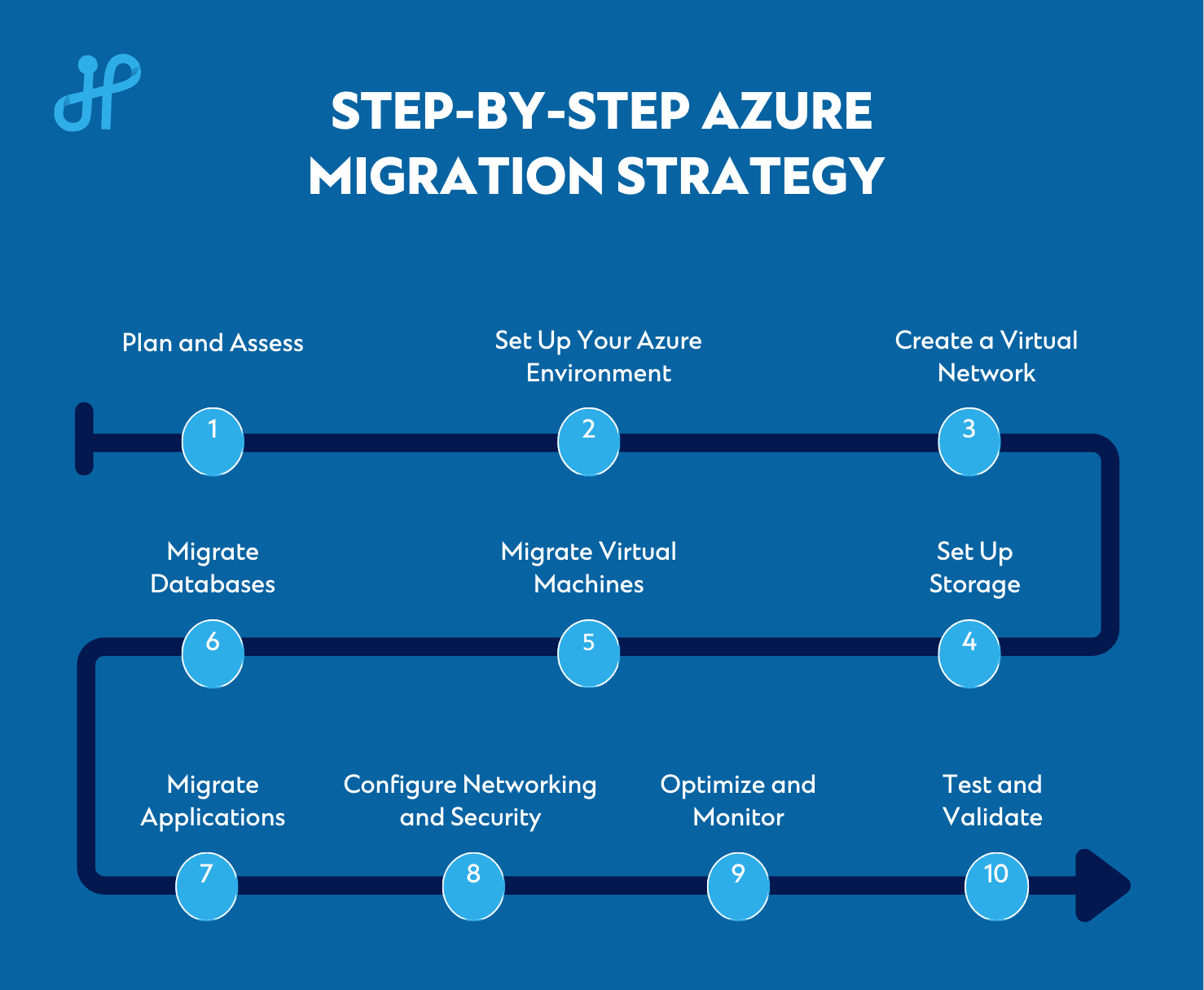
Step 1: Plan and Assess
A cloud readiness assessment helps you design a customized cloud modernization strategy by identifying legacy workloads and dependencies.
-
Start by accessing everything your organization is currently using hardware, software, servers, apps, and databases.
-
Check if all these systems are compatible with Microsoft Azure cloud services.
-
Figure out what data needs to be moved, what can be improved, and what can be left out.
-
Decide your goal: Do you want to save costs, get better performance, ensure more security, or all of them?
-
Choose your migration approach:
- Lift-and-shift (Rehosting)
- Re-platform (Re-architecting), or
- Re-architect (Refactoring).
- Set timelines and assign tasks to your team.
Step 2: Set Up Your Azure Environment
-
Go to the Azure Portal and sign up using your Microsoft account.
-
Choose a subscription plan, Free Trial or Pay-As-You-Go.
-
Create resource groups to organize services such as a folder system.
-
Provide access permission to view or manage based on individual member’s role within the organization.
Step 3: Create a Virtual Network (VNet)
-
Think of this as setting up your office’s internal network but on the cloud.
-
Use Azure to create a virtual network where your systems will live.
-
Add subnets like smaller sections of the network, assign IPs, and make sure there's no IP conflict with your current system.
-
Set up security settings to manage your organisation's access and control user permissions.
Step 4: Set Up Storage
-
In Azure, create storage accounts where your files, databases, and backups will be kept.
-
Choose the type of storage based on your needs e.g., fast access or large size.
-
Set permissions on who can view or edit files.
-
Enable replication for backup in case something goes wrong.
Step 5: Migrate Virtual Machines (VMs)
-
Check if your existing on-premise virtual machines can work smoothly on Azure.
-
Use tools like Azure Migrate or Azure Site Recovery to move them.
-
After migration, test your VMs for functionality and performance.
Step 6: Migrate Databases
-
Check if your database type like SQL, MySQL, PostgreSQL, etc. is supported by Azure.
-
Use Azure Database Migration Service to move the database without losing any data.
-
Match the old and new database settings such as schemas, structure, permissions.
-
After migrating, test to ensure your data is complete, secure, and fast to access.
Step 7: Migrate Applications
-
Review your applications to check if they can run on Azure without changes.
-
Some may need to be slightly adjusted or rebuilt for better performance on the cloud.
-
Use services like:
- Azure App Service for websites and mobile apps,
- Azure Kubernetes Service (AKS) for scalable apps,
- Azure Functions for small background jobs
- Test the applications for speed, bugs, and user experience.
Step 8: Configure Networking and Security
-
Use Network Security Groups (NSGs) to control traffic flow and decide who gets access to which app or database.
-
Set up VPN Gateways or ExpressRoute for secure private connections from your office to Azure.
-
Install firewalls, anti-DDoS, and use encryption to protect your data.
-
Implement Azure Active Directory for managing users and login security with multi-factor authentication.
Step 9: Optimize and Monitor
-
Once migrated, use Azure optimization tools like Azure Advisor to get tips on improving performance and saving money.
-
Check your monthly bill and resource usage using Azure Cost Management.
-
Use Azure Monitor and Log Analytics to track system health and get alerts in case of technical or non-technical issues.
-
Turn on auto-scaling so your systems can automatically grow or shrink based on usage.
-
Back up data regularly using Azure Backup, and plan for disaster recovery in case of outages.
Step 10: Test and Validate
-
Do thorough testing of everything like apps, data, systems, and user access.
-
Check if performance is better than before and if users can work without issues.
-
Fix anything that’s broken or underperforming.
-
Once you're confident everything works fine, go live!
Why Enterprises Choose HabileLabs for Azure Cloud Migration Services
HabileLabs is a certified Azure cloud migration partner headquartered in Jaipur, India, with a delivery team of 150+ engineers. We specialize in enterprise-grade migrations not small-scale lift-and-shifts, but complex, multi-workload transitions where data integrity, compliance, and business continuity are non-negotiable.
We have assisted many clients in modernizing their tech stacks with Azure, from consulting and evaluation to full-scale deployment and maintenance. We support full and hybrid cloud migration models based on client needs. Our customized solutions make cloud migration easy and scalable, regardless of your company's size.
Conclusion
Making the switch to Microsoft Azure is a strategic business choice rather than just a technical process that can increase productivity, creativity, and durability. Azure Migration for enterprises can go smoothly and be productive if you have the correct cloud modernization strategy, resources, and professional advice. Allow Habilelabs to be your dependable guide through this change. Get in touch with us right now to find out how we can confidently assist you in planning, carrying out, and optimizing your Azure transfer.
Ready to take the next step in your cloud journey with Microsoft Azure? Connect with Habilelabs today!