





A Guide to Accessing Expired Salesforce One-Time Links in Outlook
BySurendra Kumar


Microsoft Outlook's Safe Links feature is designed to protect users. It checks links for malicious content. However, this can cause issues with one-time links from Salesforce. It makes them expire before you get to use them.
The Problem
When you get a one-time link from Salesforce, Outlook's Safe Links scans it. This causes the link expire early. As a result, clicking on the link displays an error message stating that it has expired or has already been used.
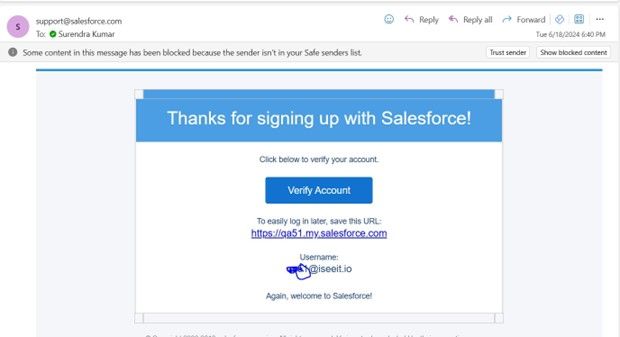
And here is the error message you might see if you try to use the link after it has been validated by Outlook:
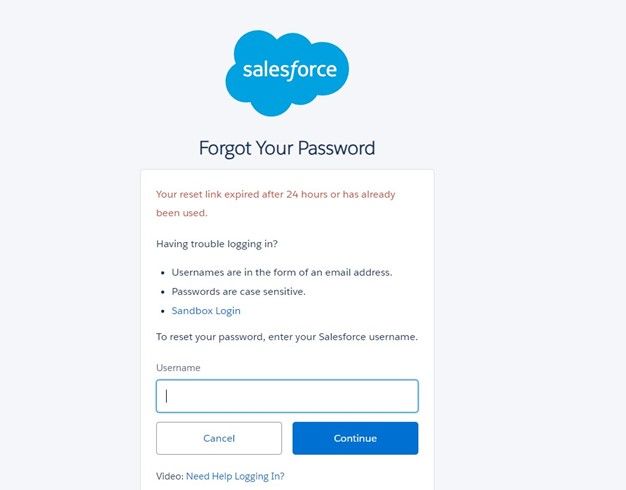
This issue is especially frustrating. You need to access key information or perform vital tasks. The one-time link is designed to enhance security by being valid for only a single use. However, the premature expiration caused by Safe Links can disrupt workflows and cause delays.
Temporary Solution
While this problem is undoubtedly frustrating, there is a temporary workaround. It can help you access these one-time links. This method is not a permanent fix, but it can save you from being completely stuck.
Here’s how you can do it:
- Copy the Link from Outlook: Instead of clicking the link in Outlook, right-click on the link. Then, select "Copy Hyperlink" or a similar option, depending on your version of Outlook.
- Use Incognito Mode in Your Browser: Open an incognito or private browsing window in your preferred browser. In most browsers, you can do this by selecting "New Incognito Window" or "New Private Window" from the menu. Or you can use the keyboard shortcut Ctrl+Shift+N (Windows) or Command+Shift+N (Mac).
- Paste and Use the Link: Paste the copied link into the address bar of the incognito window and press Enter. Since Safe Links validation won't be applied in incognito mode, the one-time link should work as intended. This workaround is straightforward and can be done quickly. However, it is important to note that this is only a temporary solution and does not address the root cause of the problem.
Important Notes
- Not a Permanent Solution: This method is a temporary workaround and not a permanent fix. It's crucial to be aware that while this can help you in the short term, a more robust solution is necessary for long-term use. Relying on this method alone can lead to repeated frustration and inefficiencies.
- Consider Alternatives: If one-time links are a regular part of your workflow, consider discussing alternative security measures with your IT department. There might be other ways to handle secure link validation without interfering with one-time links. For example, you could explore different email security solutions. Or, you could adjust the settings of existing tools. These changes might offer a more permanent fix.
Additional Considerations
While using incognito mode is a quick and effective temporary solution, it's important to think about the broader implications of this issue. Email security features, such as Safe Links, protect users. They do so by defending them from malicious attacks. So, use any workaround with caution. And, stay vigilant about your information's security.
One way to address the problem more permanently might involve working directly with Salesforce support to see if they can provide any solutions or adjustments. Additionally, exploring settings within Microsoft Outlook and Office 365 might reveal options to whitelist certain domains or types of links, reducing the likelihood of premature link expiration.
Furthermore, it is essential to keep your team informed about this issue. Educating users on how to handle one-time links and the importance of following secure practices can help mitigate risks. Regular training and updates on email security practices can go a long way in ensuring everyone is on the same page and aware of potential issues.
Future Solutions
Looking ahead, consider advocating for enhancements to the tools you use. Providing feedback to Microsoft about how Safe Links interacts with one-time links can help drive improvements. Similarly, reaching out to Salesforce to highlight the challenges you're facing can prompt them to explore more robust solutions for their users.
Ultimately, while temporary workarounds are helpful, striving for permanent solutions will ensure smoother operations and better security. Stay proactive, keep communicating with your IT department, and leverage the resources available to you for the best results.
Conclusion
Outlook's Safe Links feature is essential for maintaining email security, but it can inadvertently cause issues with one-time links. You can bypass the issue by copying the link and using an incognito window. This workaround allows you temporary access to your link. your link temporarily.
Always stay informed about potential security implications and look for more permanent solutions to ensure a smooth workflow.
Feel free to share your thoughts and experiences.
Let’s discuss and find the best solutions together!