





What is Microsoft Azure? How It Works | What You Need to Know
ByAnjali Jain

What is Microsoft Azure?
Microsoft Azure is Microsoft's cloud computing platform a globally distributed network of data centres that delivers over 200 services including virtual machines, databases, AI tools, networking, storage, and DevOps capabilities. Azure allows businesses to build, run, and manage applications without owning physical servers. Launched in 2010 as Windows Azure and rebranded in 2014, it is now the world's second-largest cloud platform by market share (~23%), trusted by 95% of Fortune 500 companies. Azure operates across 60+ regions in 140 countries the largest global cloud footprint of any provider.
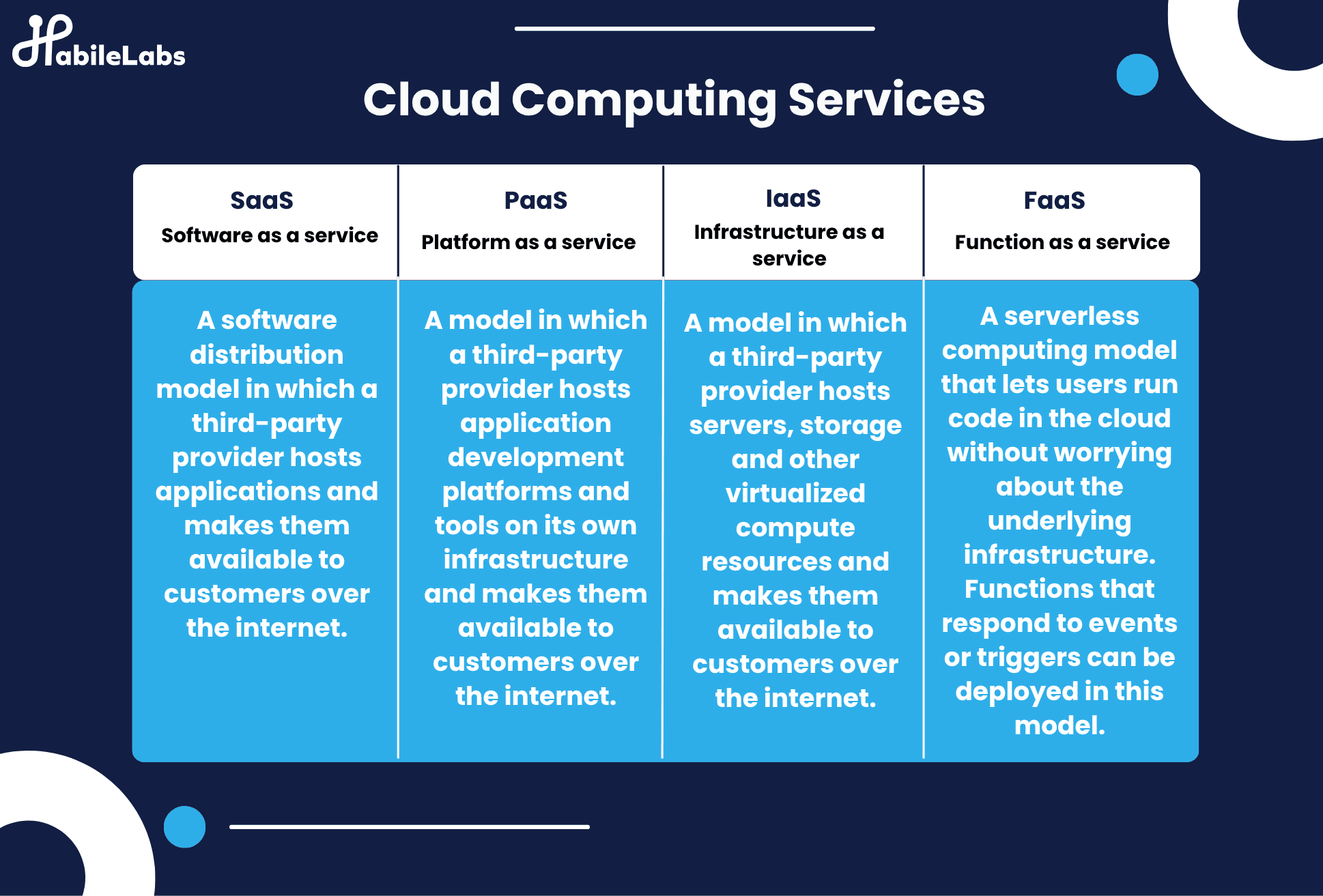
Azure operates across four key delivery models:
- Infrastructure as a Service (IaaS): Rent virtual machines, storage, and networking.
- Platform as a Service (PaaS): Focus on building apps without managing infrastructure.
- Software as a Service (SaaS): Consume fully managed cloud applications.
- Functions / Serverless: Execute code in response to triggers without provisioning servers
Why Microsoft Azure Matters in 2026
Cloud computing is no longer optional infrastructure it is the foundation of how modern businesses operate. Whether you are running a startup that needs to scale without buying servers, an enterprise migrating decade-old data centres, or a team building AI-powered applications, Microsoft Azure is likely the platform handling it.
But what exactly is Microsoft Azure, what does it do, and what does it provide? These are the questions this guide answers clearly, completely, and without jargon. By the end, you will understand why Azure has become the default cloud platform for enterprise IT, and what HabileLabs a certified Azure partner can do to help your organisation get the most from it.
HabileLabs is a certified Microsoft Azure partner in Jaipur, India. We help enterprises plan, migrate, and optimise Azure environments from a free assessment to full-scale deployment.
What Does Microsoft Azure Do?
Microsoft Azure does five core things for organisations of every size and industry:
1. Replaces Physical Infrastructure
Instead of buying and maintaining physical servers, storage arrays, and networking equipment in your own office or data centre, Azure lets you provision the same resources virtually in minutes, from a browser. A virtual machine (VM) that would take weeks to procure and deploy on-premises takes under 5 minutes to provision on Azure. Azure's infrastructure is more reliable than most on-premises setups, with 99.9–99.99% uptime SLAs on core services.
2. Runs and Hosts Applications
Azure hosts applications of any scale and type. Web apps and APIs run on Azure App Service. Containerised applications run on Azure Kubernetes Service (AKS). Serverless workloads run on Azure Functions. Mobile backends, gaming platforms, IoT applications, and enterprise ERPs all have purpose-built Azure hosting environments. Azure supports every major programming language including Python, Java, Node.js, .NET, PHP, Ruby, and Go.
3. Stores and Manages Data
Azure provides a complete data platform. Structured relational data goes into Azure SQL Database or Azure Database for PostgreSQL/MySQL. Unstructured data files, images, videos, documents is stored in Azure Blob Storage, which scales to petabytes at extremely low cost. Semi-structured and NoSQL data lives in Azure Cosmos DB, a globally distributed database with single-digit millisecond latency. All Azure storage services include built-in redundancy, encryption at rest, and automated backups.
4. Enables AI and Machine Learning
Azure is the infrastructure behind some of the world's most advanced AI products. Azure OpenAI Service Or Microsoft Copilot gives enterprises direct API access to GPT-4o, DALL-E 3, and other OpenAI models within a private, compliant environment. Azure Machine Learning is a managed platform for building, training, and deploying custom ML models. Azure AI Services provides pre-built AI capabilities speech recognition, computer vision, natural language processing, and document intelligence that developers can call via API without needing ML expertise.
5. Connects and Secures Everything
Azure provides the networking and security layer that holds the entire environment together. Azure Virtual Network creates private, isolated network environments in the cloud. Azure Active Directory (now called Microsoft Entra ID) manages identity and access for every user and application. Azure Key Vault stores secrets, certificates, and encryption keys securely. Microsoft Defender for Cloud monitors the entire Azure environment for threats and provides a continuous security score. For hybrid setups, Azure ExpressRoute creates dedicated private network connections from your office or data centre directly to Azure bypassing the public internet entirely.
How Microsoft Azure Works?
Microsoft Azure is based on a worldwide network of data centers. It uses virtualization to provide scalable, on-demand services. The Azure architecture allows you to run many types of applications. This includes AI-powered apps and secure enterprise platforms.
You can use Microsoft Azure services to deploy virtual machines, manage databases, analyze big data, and build modern AI features, all without managing physical servers.
Here’s how Azure works:
-
Global Infrastructure - Azure is built on a vast network of data centers strategically located in over 60 regions worldwide. These datacenters house the physical servers that power Azure’s virtual services. This global footprint ensures high availability, low latency, and regulatory compliance for users across different geographies.
-
Virtualization and Resource Management - Azure uses virtualization technology to run multiple virtual machines (VMs) on a single physical server. Users can quickly create resources like VMs, containers, and databases in just minutes using the Azure Portal or APIs.
-
Integrated Tools and Services - Azure supports a wide variety of programming languages, frameworks, and tools including .NET, Java, Python, Node.js, and more. It also integrates with popular DevOps pipelines and third-party services to streamline development and deployment of workflows.
-
Security & Compliance - With multi-layered security built into every component and continuous monitoring through Microsoft Defender, Azure prioritizes the protection of data, applications, and infrastructure. It also supports over 90 compliance offerings, making it one of the most trusted platforms for regulated industries like finance, healthcare, and government.
Flexible Pricing & Scalability - Azure follows a pay-as-you-go model, meaning users only pay for what they consume. It can automatically scale your resources to match demand, ensuring performance without unnecessary costs.
Core Azure Services
These are the foundational services that help companies build, run, and manage applications in the cloud:
-
Compute - Azure lets you run applications and workloads using powerful virtual machines or containers. With these Microsoft Azure services like Virtual Machines, App Services, Azure Kubernetes Service (AKS), and Azure Functions, you can launch apps quickly and scale them easily as your needs grow.
-
Storage - You can store files, data, and backups securely in the cloud. Services like Azure Blob Storage, Disk Storage, and Azure Files provide reliable and scalable storage for both structured and unstructured data.
-
Networking - Azure helps connect your apps, services, and users safely and efficiently. Tools like Virtual Networks, Load Balancers, VPN Gateways, and Azure DNS ensure fast performance and secure access, even under heavy traffic or potential cyber threats.
-
Databases - Azure offers managed databases, so you don’t have to worry about setup or maintenance. You can choose from services like Azure SQL Database (for traditional apps), Cosmos DB / SQL Database (for fast, global apps), or PostgreSQL/MySQL for open-source projects.
-
AI & Machine Learning - Add smart features like image recognition, language translation, chatbots, or predictions to your apps. Azure provides tools like Cognitive Services, Azure OpenAI, and Azure Machine Learning to bring AI into your solutions without needing to be a data science expert.
-
DevOps & Developer Tools - Azure supports modern software development with tools like Azure DevOps, GitHub Actions, and SDKs for popular languages such as .NET, Java, Python, and Node.js. These tools help automate testing, deployment, and updates.
-
Security & Identity - Azure protects your data and applications with services like Microsoft Entra ID (formerly Azure Active Directory) for secure logins, Azure Key Vault for managing passwords and keys, and Defender for Cloud for threat detection and compliance support.
Key capabilities across the Azure cloud computing platform
Beyond the core, Azure offers a wide range of specialized services tailored to industry needs and modern workloads:
-
Mobile - Build cloud-powered mobile apps with push notifications, Custom backend logic, and real-time geolocation features.
-
Web - Host and scale modern web apps, manage APIs, and deliver content globally through integrated CDN and search tools.
-
Media & Content Delivery - Azure Media Services powers cloud-based video workflows, including encoding, streaming, DRM protection, and indexing for high-value media delivery.
-
Internet of Things (IoT) - Azure Stream Analytics working with Azure IoT Hub allows you to process real-time data from devices and sensors, enabling immediate insights and automatic workflow triggers.
-
Serverless Computing - Run backend logic without managing infrastructure. Azure Functions and Logic Apps allow auto-scaling and event-driven architecture.
-
Containers - Build, deploy, and scale containerized applications using Docker, Azure Container Instances, and Azure Kubernetes Service.
-
Migration - Move existing workloads to Azure with assessment tools, migration services, and cost calculators.
-
Integration - Connect on-premises systems to the cloud with services for hybrid cloud, site recovery, and automation.
-
Analytics & Big Data - Use Azure Synapse Analytics, Data Lake, and Azure Databricks to power business intelligence and real-time analytics.
-
Mixed Reality - Develop immersive experiences with tools built for Windows Mixed Reality and HoloLens environments.
-
Microsoft Intune - Centrally manages devices and applications across your organization, enforcing security policies and remotely wiping or updating mobile apps.
Real-World Use Cases of Microsoft Azure
- Retail & OmniChannel Innovation
Major retailers including Adobe, SAP, and Walmart leverage Microsoft Azure for hyper-personalized shopping experiences, AI-driven search, and global content delivery. Walmart uses Azure AI services to improve natural language search on its website and mobile apps. This helps customers find products and engage better.
- Healthcare and Telemedicine
Healthcare providers increasingly store sensitive patient data securely on Azure and deploy AI-powered systems for tasks like diagnostic analysis and telehealth communication. Azure’s compliance certifications (e.g., HIPAA) enable institutions to build telemedicine platforms that scale safely and confidently. Many of these implementations are done via Microsoft Azure consulting service teams.
- Manufacturing & Logistics Efficiency
Organizations in manufacturing and logistics use Azure AI services along with IoT services to optimize inventory tracking, automated quality control, and monitor shipments in real time. In logistics, generative AI on Azure has reduced costs by up to 15%. It has improved inventory optimization by 35% and increased service levels by 65%.
Great! After detailing Azure’s real-world use cases, the next natural section is:
Key Benefits of Using Microsoft Azure Services
This section ties everything together by highlighting the tangible benefits businesses and developers gain by choosing Azure. Instead of repeating features, we’ll focus on value outcomes such as cost-efficiency, speed, security, and scalability.
-
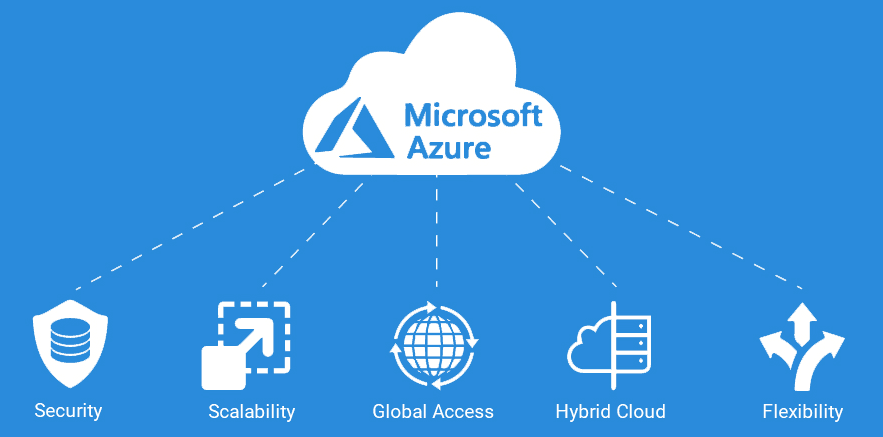
Scalability Without Complexity - Scale applications instantly using the flexibility of Microsoft Azure services and dynamic provisioning via the Azure cloud computing platform. Its auto-scaling and resource provisioning help meet changing needs without manual effort.
-
Cost Efficiency with Pay-As-You-Go Pricing - Azure’s consumption-based pricing ensures businesses pay only for what they use. This makes it easy to manage budgets, avoid over-provisioning, and reduce operational expenses—especially workloads that are dynamic or seasonal.
-
Global Reach with Local Compliance - Azure operates in more than 60 regions worldwide, giving organizations the ability to host applications closer to their users while adhering to regional data residency and compliance requirements. This is critical for industries like healthcare, finance, and government.
-
Built-In Security and Compliance - Microsoft invests over $1 billion annually in cybersecurity, and Azure benefits from this investment. With services like Microsoft Defender for Cloud, Azure Policy, and Key Vault, your data and applications are protected at every layer. Azure also supports over 90 compliance certifications globally.
-
Developer Productivity - Azure’s integration with GitHub, Visual Studio, and popular frameworks like .NET, Java, Python, and Node.js streamlines the development process and reflects the strength of Microsoft Azure fundamentals. Built-in DevOps tools and automation features allow teams to build, test, and deploy faster.
-
AI and Innovation at Your Fingertips - With Azure Cognitive Services, Azure OpenAI, and Machine Learning tools, even small teams can incorporate AI into their applications. Azure empowers businesses to create intelligent features without heavy data science expertise.
-
Reliable Hybrid and Multi-Cloud Support - Azure is uniquely strong in hybrid environments. Tools like Azure Arc and ExpressRoute are built upon a robust Azure architecture.
-
Strong Partner Ecosystem - From SAP and Oracle to Adobe and Salesforce, working with a certified Microsoft Azure partner ensures smooth integration and implementation.
How HabileLabs Helps Enterprises Get the Most from Microsoft Azure
HabileLabs is a certified Microsoft Azure partner headquartered in Jaipur, India, with 150+ cloud, data, and AI engineers. We work with enterprise clients who need Azure expertise not just to migrate workloads, but to build on Azure's AI, data, and platform capabilities to create measurable business outcomes.
Conclusion
Microsoft Azure has grown into a strong, complete cloud platform. It is made to meet the needs of startups, developers, and large companies. If you want to update old systems, Azure can help. It also supports growing applications worldwide. Additionally, Azure offers advanced AI and analytics tools. You will find the infrastructure and flexibility you need with Azure.
Its broad service offerings, global presence, strong security posture, and seamless hybrid capabilities position it as a future-ready platform for innovation and growth. Microsoft invests in cloud technology. Azure helps organizations work better. It allows them to move quickly and stay competitive in a digital world.